


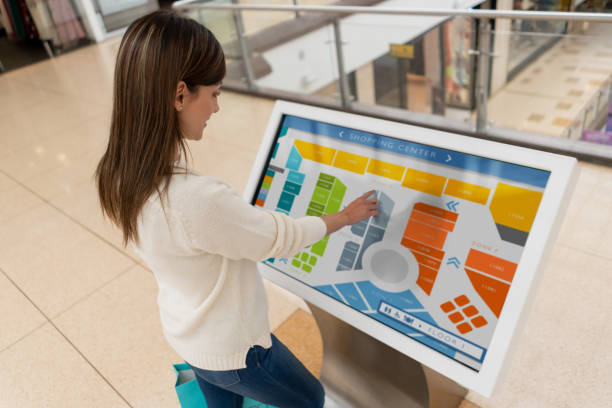
Eine zuverlässige Kiosk-Touchscreen-Display ist für Selbstbedienungsterminals in Einkaufszentren unverzichtbar, Restaurants, Kinos, Verkehrsknotenpunkte, und anderen öffentlichen Umgebungen. Im Gegensatz zu gewöhnlichen Desktop-Monitoren, Kioskdisplays müssen häufige Interaktionen bewältigen, versehentliche Stöße, Staub, Feuchtigkeit, und verlängerte Betriebszeiten. Ihre Leistung hängt auch davon ab, wie gut sich das Display in das Gehäuse integriert, Betriebssystem, Stromversorgung, und Kühlstruktur.
Für Kioskhersteller und Systemintegratoren, Die Wahl des falschen Touchscreens kann nach der Installation zu Problemen führen. Bei Benutzern kann es zu ungenauen Berührungseingaben kommen, beschädigtes Frontglas, Bildschirmverfärbung, oder instabiler Betrieb. Diese Probleme können die Wartungskosten erhöhen und das gesamte Benutzererlebnis beeinträchtigen.
In diesem Handbuch werden die wichtigsten Funktionen von erklärt kommerzielle Kiosk-Touchscreen-Displays. Es vergleicht PCAP- und Infrarot-Touch-Technologien, untersucht physischen Schutz und Montagemöglichkeiten, and provides a practical procurement checklist for different self-service applications.
1. Demands on Touchscreens in Unattended Public Kiosks
Public kiosks operate in environments where users interact with equipment without direct supervision. daher, their displays need more than basic touch functionality.
A suitable kiosk touchscreen should balance durability, Berührungsgenauigkeit, visibility, and long-term operating stability.
1.1 Resistance to Scratches and Accidental Impacts
Public touchscreen displays face frequent contact from fingers, fingernails, rings, keys, and other objects. Some users may also press the screen with excessive force.
These conditions can damage exposed display surfaces and affect touch performance.
Kiosk manufacturers should evaluate:
- Front glass material and thickness.
- Surface hardness and scratch resistance.
- Impact protection requirements.
- Glass edge treatment and installation support.
- Protection against accidental contact with hard objects.
Tempered glass can improve resistance to impact compared with ordinary glass of similar thickness and construction. Jedoch, its actual protection depends on glass quality, thickness, processing, mounting, and the complete enclosure design.
For high-traffic locations, buyers should consider additional front protection and a structure that prevents direct pressure on the LCD panel.
1.2 Protection Against Water, Staub, and Environmental Contamination
Public kiosks may be installed near restaurant counters, entrances, outdoor walkways, and transportation facilities.
Staub, Fingerabdrücke, cleaning liquids, and accidental splashes can affect touchscreen operation.
Moisture can be particularly challenging for capacitive touchscreens. Water droplets or conductive contamination on the surface may create unintended touch signals.
To reduce these risks, buyers should assess:
- Front-panel ingress protection requirements.
- Glass-to-frame sealing.
- Touch-controller water-rejection capability.
- Surface cleaning requirements.
- Cable and connector protection.
- Enclosure drainage and ventilation design.
An IP rating describes protection against specified ingress conditions. It does not automatically mean that the entire kiosk is waterproof.
The final protection level depends on the display assembly, Gehäuse, connectors, cable entries, und Installation.
1.3 Continuous Operation and Thermal Stability
Many self-service kiosks operate for extended periods. Some installations require 24/7 Betrieb, while others follow specific business hours.
A display designed for continuous use should have suitable components and thermal management.
Important factors include:
- Rated operating hours and duty cycle.
- LED backlight lifespan specifications.
- Betriebstemperaturbereich.
- Internal heat dissipation.
- Power supply stability.
- Helligkeitsmanagement.
- Ventilation around the display.
Continuous operation also increases the importance of heat management.
If heat accumulates inside a sealed kiosk enclosure, it may shorten component life and affect display performance. Excessive temperatures can contribute to LCD discoloration, uneven appearance, or other panel damage.
daher, system integrators should evaluate the display and enclosure as one thermal system.
1.4 Electrical Interference and Touch Stability
Kiosks often contain computers, Netzteile, Kartenleser, Drucker, wireless modules, and other electronic components.
These devices may create electrical noise that affects touchscreen operation if the system is poorly designed.
Potential symptoms include:
- Missed touch input.
- Unstable touch coordinates.
- Unexpected touch signals.
- Intermittent communication.
- Touch response changes when connected peripherals operate.
A stable installation requires proper grounding, shielding where necessary, Kabelführung, and compatible power design.
Buyers should also confirm that the touchscreen controller supports the intended operating system and interface.
2. Touch Technology Selection: PCAP vs. Infrarot
Projected capacitive (PCAP) and infrared (UND) are two common technologies used in commercial touchscreen displays.
Both can support interactive kiosk applications, but they use different detection methods. Their suitability depends on screen size, environmental conditions, user interaction, and installation requirements.
2.1 PCAP Touchscreen Displays: A Smooth and Modern User Experience
Die projiziert-kapazitive Touch-Technologie erkennt Veränderungen im elektrischen Feld rund um die Bildschirmoberfläche.
Es wird häufig in Smartphones verwendet, Tabletten, interaktive Displays, und kommerzielle Selbstbedienungsterminals.
Ein PCAP-Touchscreen unterstützt im Allgemeinen:
- Multi-Touch-Gesten.
- Glatte Frontglasoberflächen.
- Schnelle und reaktionsschnelle Interaktion.
- Moderne, durchgehende Designs.
- Fingerbasierte Bedienung.
Denn PCAP-Sensoren können durch eine geeignete Glasschicht hindurch arbeiten, Hersteller können eine saubere Vorderseite ohne den erhöhten Rahmen schaffen, der bei einigen älteren Touch-Technologien häufig auftritt.
Dieses Design kann die Reinigung erleichtern und ein integrierteres Erscheinungsbild des Kiosks unterstützen.
Jedoch, Die PCAP-Leistung hängt von der Sensorstruktur ab, Regler, Glasdicke, Erdung, und Betriebsumgebung.
2.2 Infrarot-Touchscreens: Flexible Größenanpassung und rahmenbasierte Erkennung
Infrared touch technology uses infrared emitters and receivers arranged around the screen perimeter.
These components create an invisible grid of light beams. When a finger or object interrupts the beams, the controller calculates the touch position.
Common characteristics include:
- Detection without relying on electrical conductivity.
- Compatibility with different touch objects.
- Potential suitability for large interactive screens.
- No need for a conventional conductive touch layer on the display surface.
- A frame-based structure around the active display area.
IR touch technology can be useful for large-format interactive kiosks and applications that require flexible touch input.
Jedoch, the infrared frame needs suitable protection. Staub, debris, or objects blocking the optical path may affect performance. Strong ambient infrared sources can also influence certain designs, depending on the system.
2.3 PCAP vs. UND: Hauptunterschiede
| Vergleichsfaktor | PCAP Touchscreen | Infrared Touchscreen |
|---|---|---|
| Detection method | Changes in an electrical field | Interruption of infrared beams |
| Front design | Can support a smooth, flat surface | Usually requires a perimeter frame |
| Multi-touch | Commonly supported | Depends on controller and configuration |
| Touch objects | Usually fingers or compatible conductive objects | Can detect fingers and many non-conductive objects |
| Moisture sensitivity | Requires suitable water-rejection design | Water may affect the surface, but detection does not rely on conductivity |
| Dust considerations | Surface contamination may affect operation | Dust or debris can obstruct the optical path |
| Large-screen applications | Available in different sizes and configurations | Often considered for larger interactive displays |
| Wartung | Smooth surfaces can simplify cleaning | Optical frame may require inspection and cleaning |
Neither technology is universally better.
PCAP may suit modern self-service terminals with flat glass and multi-touch requirements. IR may suit selected large-format installations where touch-object flexibility is important.
2.4 How to Reduce Ghost Touch and Unintended Input
Ghost Touch describes unexpected touch signals that occur without intentional user interaction.
It can create serious problems in public kiosks. Zum Beispiel, an unintended touch may select the wrong payment option or interrupt a transaction.
Common contributing factors include:
- Water droplets or conductive contamination.
- Electrical noise from internal components.
- Poor grounding or shielding.
- Incompatible power supplies.
- Touch-controller configuration.
- Mechanical pressure on the sensor structure.
For PCAP systems, buyers should ask about water-rejection algorithms and controller tuning. These features can help reduce unintended input, but they do not eliminate every moisture-related issue.
For either PCAP or IR systems, system integrators should test the complete kiosk under realistic operating conditions.
A useful test should include normal touch interaction, cleaning procedures, connected peripherals, expected lighting, and the intended power configuration.
3. Structural Durability: Vandal-Resistant Glass and IK Ratings
The front structure protects the display from physical contact and environmental exposure.
For public kiosks, buyers should evaluate glass construction, surface hardness, impact resistance, and mounting support together.
3.1 Tempered Glass for Front Protection
Tempered glass is processed to improve its mechanical strength compared with ordinary glass of similar thickness.
It is commonly considered for commercial touchscreen applications because it can provide a durable front surface.
When specifying tempered glass, buyers should confirm:
- Glass thickness.
- Tempering process and quality.
- Edge treatment.
- Surface finish.
- Optical clarity.
- Impact requirements.
- Compatibility with the touch sensor.
Glass thickness alone does not determine impact resistance.
The glass material, processing, support structure, and impact conditions all influence the final result.
For applications with higher vandalism risks, integrators should evaluate the complete front assembly rather than relying on glass thickness alone.
3.2 Understanding IK Ratings for Kiosk Displays
IK ratings classify the resistance of an enclosure to mechanical impacts under defined test conditions.
They are covered by IEC 62262 and help buyers compare impact protection requirements.
Common levels include IK07, IK08, IK09, and IK10.
| IK Rating | Impact Energy | Typical Procurement Consideration |
|---|---|---|
| IK07 | 2 J | Moderate impact protection |
| IK08 | 5 J | Higher impact protection |
| IK09 | 10 J | More demanding impact conditions |
| IK10 | 20 J | High impact protection requirements |
These values describe standardized impact energy levels. They do not guarantee that every component behind the enclosure will remain undamaged under every real-world impact.
An IK rating should also be verified for the actual tested assembly.
Zum Beispiel, an IK-rated kiosk enclosure does not automatically prove that a separately supplied touchscreen module has the same rating.
Buyers should request the relevant test report and confirm its scope.
3.3 What Does 7H Surface Hardness Mean?
Some commercial touchscreen products specify a 7H surface hardness.
This value generally refers to a pencil hardness test used to assess resistance to surface scratching under defined test conditions.
It should not be confused with an IK impact rating.
The two measurements address different properties:
- Pencil hardness: Evaluates resistance to scratching under a specified test method.
- IK rating: Evaluates enclosure resistance to mechanical impact.
A 7H specification does not mean that the screen is vandal-proof or resistant to every sharp object.
Buyers should confirm which surface layer was tested. The result may refer to a coating, protective film, or glass surface rather than the complete touchscreen assembly.
3.4 Combining Glass, Sealing, and Enclosure Protection
A durable kiosk front requires more than strong glass.
The complete structure should address:
- Glass support and edge protection.
- Secure bonding or mechanical fixing.
- Sealing between the glass and frame.
- Protection against dust and moisture ingress.
- Prevention of excessive pressure on the LCD panel.
- Suitable maintenance access.
Poor installation can create stress points around the glass edges. These points may increase the risk of damage during impact or repeated use.
For high-traffic installations, buyers should review the front assembly and enclosure drawings before approving production.
4. Integration and Mounting: VESA Patterns and Flush-Mount Enclosures
A kiosk touchscreen must fit the mechanical structure and electronic architecture of the complete self-service terminal.
Mounting compatibility, cable access, display dimensions, and thermal design all affect installation quality.
4.1 VESA Mounting Patterns for Easier Integration
VESA mounting patterns provide standardized hole arrangements for compatible display mounting systems.
They help integrators select brackets, arms, and support structures.
Zu den gängigen Mustern gehören::
- 75 × 75 mm.
- 100 × 100 mm.
- 200 × 100 mm.
- 200 × 200 mm.
Not every touchscreen supports every pattern. The available mounting options depend on screen size and product design.
Vor der Bestellung, bestätigen:
- Exact VESA hole spacing.
- Mounting screw specifications.
- Maximum supported mounting load.
- Display weight.
- Rear clearance.
- Cable routing space.
- Required installation orientation.
VESA compatibility does not replace a structural review of the kiosk enclosure.
The mounting frame must support the display securely under expected operating conditions.
4.2 Flush-Mount Installation for a Clean Front Design
Flush mounting integrates the touchscreen into the front panel of the kiosk.
The display surface sits close to the surrounding enclosure, creating a more unified appearance.
This structure can provide several benefits:
- A cleaner front design.
- Reduced exposed edges.
- Easier surface cleaning.
- Better alignment with custom enclosure panels.
- More consistent product appearance.
Jedoch, flush mounting requires accurate mechanical dimensions.
If the opening is too small, the frame may apply pressure to the display. If the gap is too large, dust and debris may collect around the edges.
Integrators should confirm the cutout dimensions, mounting tolerance, glass position, and sealing method before manufacturing the kiosk enclosure.
4.3 Cable Management and Interface Compatibility
A touchscreen display needs to communicate with the kiosk’s host system.
Common interface options include:
| Interface | Hauptfunktion | Integration Considerations |
|---|---|---|
| HDMI | Video signal | Confirm resolution and refresh-rate compatibility |
| DisplayPort | Video signal | Check host and display connector support |
| VGA | Analog video | Confirm legacy system requirements |
| USB | Touch data | Check operating system and controller compatibility |
| RS232 | Serial communication | Confirm protocol and driver requirements |
Some displays use separate video and touch interfaces. Others may offer different interface combinations.
Buyers should confirm the complete interface configuration before ordering.
Also consider cable length, connector direction, access for maintenance, and protection against accidental disconnection.
4.4 Thermal Management Inside Enclosed Kiosks
Kiosk enclosures can restrict natural airflow, especially when they contain computers, Drucker, Kartenleser, and power supplies.
Heat generated by these components may accumulate around the display.
Excessive temperature can affect the LCD panel, Hintergrundbeleuchtung, touch controller, and other electronic components.
Possible symptoms include:
- Uneven screen appearance.
- Reduced brightness.
- Unstable operation.
- Color changes.
- Premature component aging.
Black spots or other abnormal display marks may have different causes, including pressure damage, Plattendefekte, und thermischer Stress. They should not automatically be classified as solarization.
To reduce thermal risks, integrators should:
- Review the display’s specified operating temperature.
- Calculate the heat generated by internal components.
- Provide suitable ventilation or active cooling.
- Avoid blocking the display’s ventilation areas.
- Separate high-heat components where practical.
- Test the assembled kiosk under expected operating conditions.
The display’s operating temperature specification should guide enclosure design. A suitable thermal test should reflect the actual installation, not only the display module operating by itself.
5. Real-World Applications and Procurement Checklist
Different kiosk applications have different display requirements.
A shopping mall directory may prioritize visibility and multi-touch navigation. A restaurant ordering terminal may need easy cleaning and reliable touch input. A cinema ticket machine may require durable construction and stable operation during busy periods.
5.1 Shopping Mall Directory Kiosks
Shopping mall directories help visitors locate stores, Restaurants, Einrichtungen, and service areas.
These kiosks often use larger interactive screens with map navigation and searchable content.
Recommended considerations include:
- Large screen sizes for clear information display.
- PCAP multi-touch for interactive maps.
- Suitable brightness for indoor ambient lighting.
- Durable front glass.
- Stable operation during extended business hours.
- Accessible mounting height and viewing angle.
If the directory is installed near a glass entrance or exposed to strong sunlight, buyers should evaluate ambient-light conditions and display brightness.
5.2 Restaurant Self-Service Ordering Kiosks
Restaurant kiosks allow customers to browse menus, customize orders, and complete payments.
They may be installed near entrances, counters, or food collection areas.
Important display requirements include:
- Responsive touch input.
- Easy-to-clean front surfaces.
- Suitable protection against accidental splashes.
- Clear menu visibility.
- Stable integration with payment and ordering systems.
- Enclosure design that supports routine maintenance.
PCAP touchscreens can provide a smooth interface for menu selection. Jedoch, the system should be tested with realistic cleaning procedures and expected moisture exposure.
5.3 Cinema Ticketing and Transportation Kiosks
Ticketing kiosks may operate continuously during business hours and experience high user traffic.
They often integrate touchscreen displays with printers, Scanner, Zahlungsgeräte, and ticketing software.
Buyers should prioritize:
- Durable front structures.
- Stable touch accuracy.
- Reliable interface compatibility.
- Suitable screen brightness.
- Secure mounting.
- Effective thermal management.
- Easy access for maintenance.
For outdoor or semi-outdoor installations, environmental protection and sunlight readability become more important.
The selected display should match the actual installation conditions rather than rely on indoor specifications.
5.4 Kiosk Touchscreen Display Procurement Checklist
Bevor Sie eine Großbestellung aufgeben, system integrators should confirm the following specifications.
| Procurement Factor | Questions to Confirm |
|---|---|
| Bildschirmgröße | Does it match the kiosk layout and viewing distance? |
| Auflösung | Is the resolution suitable for the user interface? |
| Helligkeit | Does it meet the ambient-light requirements? |
| Touch technology | Is PCAP or IR more suitable for the application? |
| Touch points | How many simultaneous touch points are required? |
| Front glass | What material, thickness, and surface treatment are available? |
| Impact protection | Is an IK-rated assembly required? Can the supplier provide test evidence? |
| Surface hardness | What layer was tested, and which test method was used? |
| Ingress protection | What parts of the display assembly are covered by the IP rating? |
| Operating hours | Is the display rated for the required duty cycle? |
| Temperature | Does the operating range match the enclosure environment? |
| Interfaces | Are the video and touch interfaces compatible with the host system? |
| Mounting | Are VESA or custom mounting dimensions available? |
| Customization | Can the display support the required bezel, logo, and enclosure design? |
| Testing | Can the complete assembly be tested before bulk production? |
A detailed specification sheet helps reduce misunderstandings between display suppliers, kiosk manufacturers, und Systemintegratoren.
6. Frequently Asked Questions About Kiosk Touchscreen Displays
Q1. What is the best touchscreen technology for a self-service kiosk?
PCAP and infrared are both suitable for different kiosk applications.
PCAP supports smooth front-glass designs and common multi-touch interactions. IR can detect many non-conductive objects and may suit selected large-format installations.
The right choice depends on screen size, moisture exposure, touch requirements, Wartung, and budget.
Q2. How can I prevent ghost touch on a kiosk touchscreen?
Start by identifying possible sources of unintended input.
Water droplets, electrical interference, poor grounding, controller settings, and mechanical pressure can all contribute.
Choose a suitable touch controller, confirm grounding and shielding, and test the complete kiosk with its connected peripherals.
For PCAP displays, ask about water-rejection capabilities and controller tuning.
Q3. What IK rating should a public kiosk touchscreen have?
The required IK rating depends on the installation environment and expected impact risks.
A shopping mall directory may have different protection requirements from an unattended outdoor ticketing terminal.
Buyers should define the expected impact conditions and request test evidence for the complete assembly. IK10 should not be treated as a universal requirement for every public kiosk.
Q4. Does 7H hardness mean the touchscreen is vandal-proof?
NEIN. A 7H pencil hardness rating relates to surface scratch resistance under a specified test method.
It does not measure impact resistance or prove that the display can withstand vandalism.
For physical protection, buyers should also evaluate glass construction, Gehäusedesign, and relevant IK test results.
F5. Can a kiosk touchscreen display operate 24/7?
Some commercial displays are designed for extended or continuous operation.
Jedoch, buyers should confirm the manufacturer’s rated duty cycle, Betriebstemperatur, backlight specifications, and warranty conditions.
The kiosk enclosure must also provide suitable ventilation and thermal management.
F6. What is the difference between an open-frame touchscreen and a standard monitor?
An open-frame touchscreen is designed for integration into custom equipment or enclosures.
It typically provides mounting features that allow system integrators to install the display within a kiosk structure.
A standard desktop monitor is generally designed for standalone use and may not provide the same mechanical integration options.
F7. Can kiosk touchscreen displays support custom sizes and interfaces?
Custom options depend on the supplier’s product range and engineering capabilities.
Possible requirements include different screen sizes, Helligkeitsstufen, touch technologies, interface combinations, mounting structures, and front-panel designs.
Buyers should provide their mechanical drawings and technical requirements to confirm feasibility.
Abschluss: Match the Touchscreen to the Complete Kiosk System
Auswählen eines Kiosk-Touchscreen-Display requires more than comparing screen size, Auflösung, and price.
The right solution must match the public environment, touch interaction requirements, physical protection level, mounting structure, and thermal conditions.
PCAP provides a smooth front design and responsive multi-touch experience. Infrared offers a different detection method that can suit selected large-format and specialized applications. Tempered glass, IK-rated enclosure protection, and suitable surface treatments help address physical risks, but each specification must be evaluated according to its test method and scope.
For system integrators, the most important step is to assess the complete kiosk assembly. Confirm touch stability, ingress protection, impact resistance, interface compatibility, and heat dissipation before approving mass production.
HOSDA bietet customized LCD advertising display solutions for commercial applications. Share your screen size, touch requirements, installation drawings, and operating environment to discuss a display configuration for your kiosk project.
