


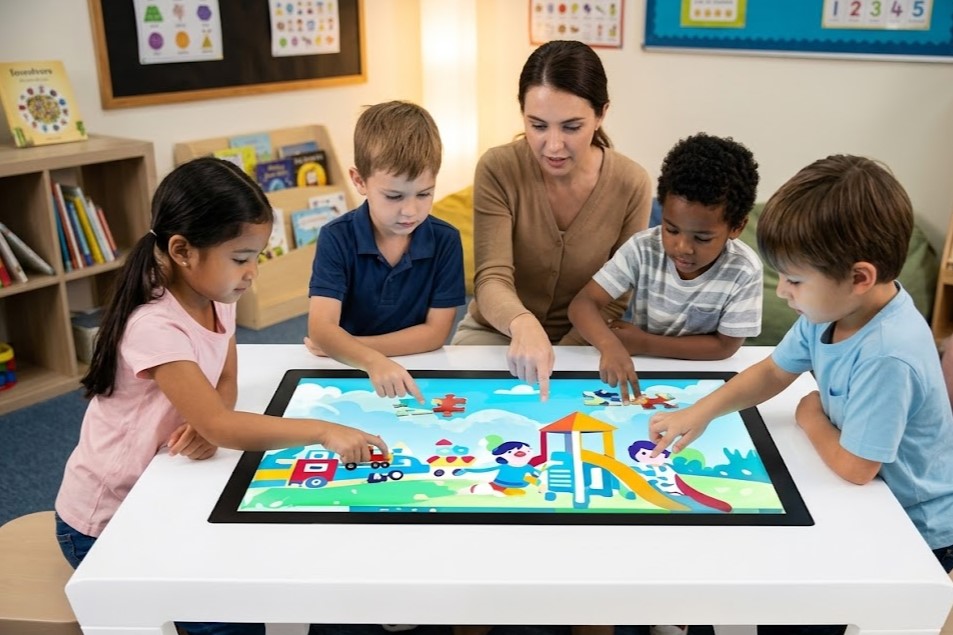
When procurement managers and spatial designers audit hardware specifications for interactive furniture, the touch-point metric often sparks intense debate. Is upgrading from a standard 10-point configuration to a high-density 20-point system just slick marketing, or does it unlock genuine functional utility?
The history of display engineering shows that multi-finger tracking is a deliberate product design choice rather than a technical barrier. As early as 2010, pioneers like 3M demonstrated Projected Capacitive Technology (PCT) capable of tracking 20 simultaneous touch points with ultra-low latencies down to 6 milliseconds.
Today, the true bottleneck is not whether a display can register multiple inputs, but how those inputs map to real-world user behavior. When transitioning from a vertical kiosk to a horizontal multi-touch LCD interactive table, user behavior changes fundamentally. This guide breaks down the spatial requirements of multi-touch systems to ensure your next hardware rollout matches your exact collaborative needs.
1. Touch-Point Demand Matrix Across Commercial Environments
Selecting the right touch specifications depends entirely on your intended user density and software interface complexity. The table below outlines how touch points map to real-world deployment scenarios:
| Touch Specification | Target Environment | Core Application | Concurrent Users |
| 10-Point Touch | Retail Showrooms, QSR Dining, Wayfinding Hubs | Product catalogs, endless aisles, digital menu ordering, and single-user gaming | 1–2 Active Users |
| 20-Point Touch | Classrooms, Corporate Huddle Rooms, Architecture Studios | Group whiteboarding, design reviews, and multi-user competitive games | 3–4 Active Users |
| 50-Point+ Touch | Museum Galleries, Command Centers, Innovation Labs | Massive multi-user data mapping, community brainstorming workshops | 5–10 Active Users |
2. The “Efficiency Plateau” in Group Dynamics
Why is a 20-point multi-touch table widely considered the industry sweet spot for teamwork, rather than a 10-point or a 100-point model? The answer lies in the ergonomics of shared horizontal surfaces.
 [1-2 Users: 10 Points] ──> Comfortably handles basic single-user gestures (pinch, zoom, swipe).
 [3-4 Users: 20 Points] ──> Optimal Collaborative Threshold. Everyone gets full two-handed control.
 [5+ Users: 50+ Points] ──> Critical Chaos Zone. Surface crowding degrades overall efficiency.
HCI (Human-Computer Interaction) studies show that when more than four people simultaneously operate a single horizontal workspace, collective efficiency begins to plateau and degrade. This is known as physical workspace crowding.
For 3 to 4 users working together around a table, a 10-point screen breaks down immediately. If four users try to use two-handed gestures (like pinching to zoom an image or rotating a blueprint) at the same time, a 10-point screen runs out of available tracking channels. The system drops inputs, causing freezing and a frustrating user experience. Upgrading to a 20-point framework guarantees that 4 users can work simultaneously with full two-handed control without experiencing input lag.
3. The Technical Pillars of High-Density Tables
Building a commercial-grade, horizontal collaborative touchscreen requires strict adherence to demanding engineering tolerances that vertical wall monitors simply do not face.
                  ┌────────────────────────────────────────┐
                  │ Premium PCT Table Engineering Core     │
                  └────────────────────────────────────────┘
                                       │
       ┌───────────────────────────────┼───────────────────────────────┐
       ▼                               ▼                               ▼
 [Ultra-Low Input Latency]     [Palm Rejection Firmware]     [Thermally Toughened Glass]
 6ms to 10ms response window   Filters out accidental        Resists heavy impact, heat,
 prevents dragging lag.        palm and forearm contact.     and liquid spills.
-
Advanced Capacitive Touch Technology (PCT): Unlike cheap infrared (IR) frames that use bezel-mounted light beams—which can be accidentally tripped by shirt sleeves, dust, or bright sunlight—modern interactive tables rely on chemically etched copper or ITO sensor grids laminated beneath a heavy glass top coat.
-
6ms–10ms Response Window: To make digital writing feel natural, the touch controller’s scanning frequency must register and process inputs within a 6 to 10-millisecond window. Any slower, and users will feel a jarring lag between their fingers and the digital ink.
-
Palm Rejection Algorithms: Because users naturally lean on a table surface while writing or drawing, the controller’s firmware must feature advanced palm rejection. The system must instantly differentiate between the high-pressure, broad surface signature of a resting palm or forearm and the precise, high-charge input of a tracking fingertip.
4. Sourcing & Procurement: Avoiding the Marketing Traps
When sourcing hardware for public or educational use, look closely at the manufacturer’s specification sheet to protect your investment:
-
Beware of “Interpolated” Multi-Touch: Some budget suppliers market “20 touch points” using lower-tier controllers that achieve this number through software interpolation. In practice, the hardware cannot actually track 20 distinct coordinates at the same millisecond. To protect your project, require suppliers to provide certified multi-point pressure stress-test videos showing 20 individual fingers drawing continuous lines simultaneously without dropouts.
-
Insist on IP65-Sealed Flush Surfaces: Because these displays serve as functional tables, drinks will eventually spill on them. Avoid raised-bezel designs that trap liquids and dust in the corners. Opt instead for a completely flat, edge-to-edge glass top with an IP65 waterproof rating to ensure your hardware can be easily wiped down and sanitized daily.
Conclusion: Form Follows Collaboration
In interactive space planning, choosing the right touch density is a foundational design choice that shapes how people connect and collaborate.
Stop bottlenecking your design studios, exhibition spaces, or modern classrooms with restrictive single-user interfaces. By deploying an advanced, 20-point multi-touch LCD interactive table engineered to track complex, multi-user gestures, you create an inviting hub for true collaborative innovation.
Explore HOSDA’s cutting-edge selection of flush-surface, high-precision interactive furniture solutions today to find the perfect anchor piece for your shared spaces.
